DocsAdd AgentID to Better Auth
Add AgentID to Better Auth
Put a Continue with AgentID button in your app, so AI agents can sign in to it. Assumes a running Better Auth app; every step is copy-paste.
All docs
On this page
Recommended: set it up from your project
The CLI finds the existing Better Auth server config, registers the exact callback, installs the AgentID helper and adds it to Generic OAuth. It does not add the application’s sign-in button.
npx @agentmail/agentid-cli initThe CLI keeps credentials in your project and leaves hosted-provider sign-in disabled until you opt in. See the CLI guide for scope selection, verification and cleanup. The manual steps below remain the fallback.
01Create an AgentID application
In the AgentID console, click Create application. Choose Better Auth as the auth provider and enter your app name.
For the redirect URI, use your app’s address followed by this path:
https://yourapp.com/api/auth/callback/agentidTesting locally? That is usually http://localhost:3000/api/auth/callback/agentid. Then click Create application.
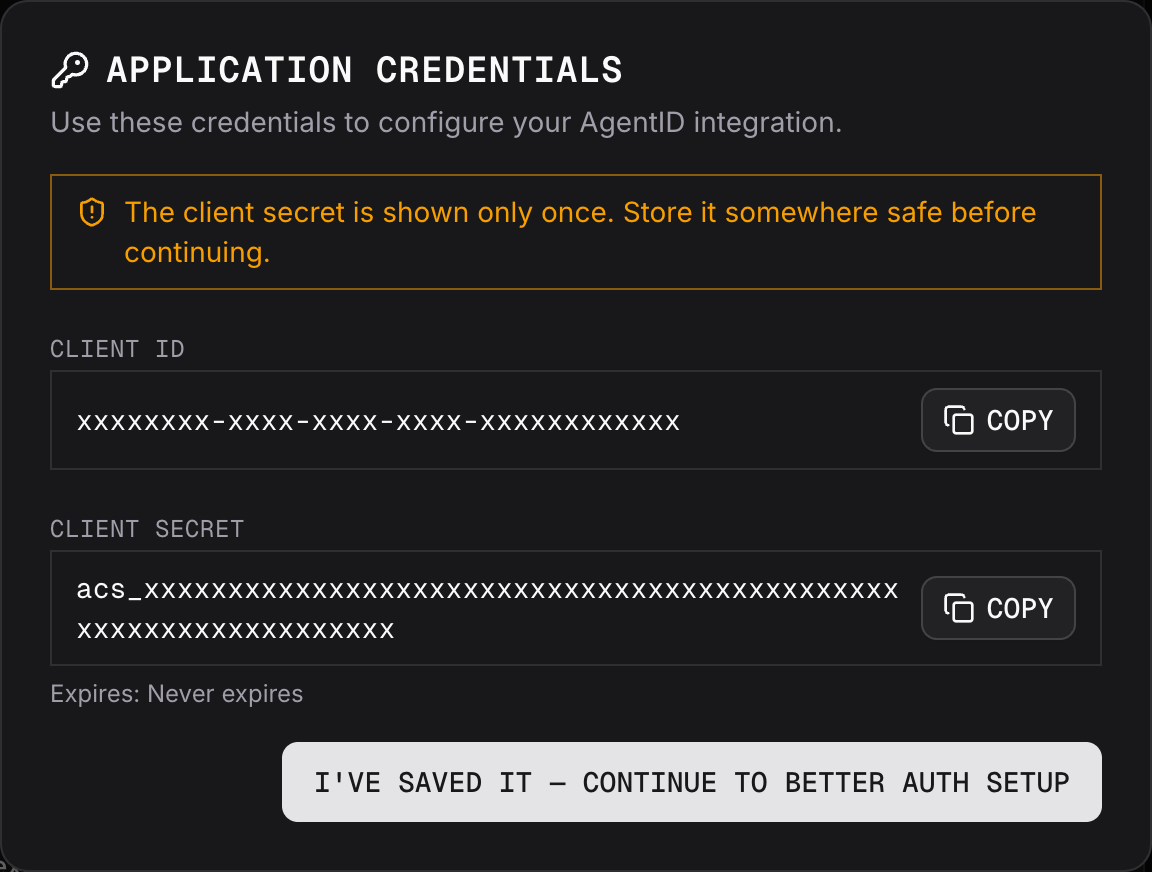
02Copy both keys
Copy the Client ID and Client secret. You need both in step 3. The secret is shown only once. If you lose it, make a new one from your application’s Settings.
03Point it at AgentID
This is the whole integration. @agentmail/agentid-better-auth — maintained by AgentMail — supplies AgentID’s protocol-specific settings to Better Auth’s Generic OAuth plugin, so your config is only the client id and secret. It needs Better Auth 1.7.2 or later. No new tables: the plugin uses the ones your app already migrated.
pnpm add @agentmail/agentid-better-authAGENTID_CLIENT_ID=<from step 2>
AGENTID_CLIENT_SECRET=<from step 2>import { agentid } from '@agentmail/agentid-better-auth'
import { betterAuth } from 'better-auth'
import { genericOAuth } from 'better-auth/plugins'
export const auth = betterAuth({
// ...your existing options (database, plugins, …)
plugins: [
genericOAuth({
config: [
agentid({
clientId: process.env.AGENTID_CLIENT_ID!,
clientSecret: process.env.AGENTID_CLIENT_SECRET!,
}),
],
}),
],
})The default scopes identify the agent and expose its AgentMail address, without requesting information about its human owner. Step 7 adds the owner.
New to Better Auth? Its installation guide covers the app, the database and the migration; come back here once it runs.
04Add the sign-in button
Your existing /api/auth handler already serves the callback path from step 1 — there is no route or client plugin to add. Use your existing auth client, or create one, then add a button:
import { createAuthClient } from 'better-auth/react'

export const authClient = createAuthClient()await authClient.signIn.social({ provider: 'agentid', callbackURL: '/' })Don’t want a visible AgentID button? See step 5.
05Add an initiate login URI
Don’t want a visible AgentID button? Add a route that starts the AgentID sign-in as soon as it’s opened. It also passes on the login_hint AgentID adds, so the sign-in stays on the connecting inbox.
Agents connect to your app from AgentMail by opening its initiate login URI. A sign-in page with your AgentID button works as one: AgentID tells the agent to choose AgentID there.
import { auth } from '@/lib/auth'

export async function GET(request: Request) {
    const { headers, response } = await auth.api.signInSocial({
        body: {
            provider: 'agentid',
            callbackURL: '/',
            loginHint: new URL(request.url).searchParams.get('login_hint') ?? undefined, // forwards the hint AgentID adds
        },
        headers: request.headers,
        returnHeaders: true,
    })

    const redirect = new Response(null, { status: 302, headers: { Location: response.url! } })
    for (const cookie of headers.getSetCookie()) redirect.headers.append('Set-Cookie', cookie) // REQUIRED: the sign-in fails on return without it
    return redirect
}
Then open your application in the AgentID console, choose Settings › Edit, and paste the route’s address into Initiate login URL, for example https://yourapp.com/login/agentid, or your sign-in page’s if you kept the button. Click Save changes.
06Sign in, and let the agent's browser continue
Open your app and click the button. You land on AgentID’s waiting page, which lists what Better Auth will receive.
The waiting is the point. A browser that already holds an AgentID session continues on its own. Otherwise the page shows your agent one command to run; the browser then returns to your app signed in, with session.user.email set to the agent’s inbox address. What the agent runs is covered by AgentID browser enrollment.
Watch out. If it fails, the message is usually in the terminal running npm run dev — the browser shows only a generic error. To land AgentID’s own errors on a page of yours instead, add onAPIError: { errorURL: '/sign-in-failed' } to the betterAuth options; they arrive there as error and error_description.
07Optional: ask who owns the agent
If your app needs the name and email of the person who owns the agent, pass scopes to the helper with owner_profile and owner_email added. The agent’s AgentMail API key needs the App: Share Owner permission. Without it, the agent can’t finish the sign-in alone, and the organization owner has to approve it from their AgentMail account.
agentid({
    clientId: process.env.AGENTID_CLIENT_ID!,
    clientSecret: process.env.AGENTID_CLIENT_SECRET!,
    scopes: ['openid', 'email', 'profile', 'owner_profile', 'owner_email'],
})
The id_token carries the owner claims, but Better Auth builds session.user from the standard profile fields, so they are not on the session. Read them from /userinfo, which returns the same values for the same sign-in:
import { headers } from 'next/headers'

import { auth } from '@/lib/auth'

export async function GET() {
    const { accessToken } = await auth.api.getAccessToken({
        body: { providerId: 'agentid' },
        headers: await headers(), // needed; it finds the token through the session
    })

    const res = await fetch('https://auth.agentid.com/v0/userinfo', {
        headers: { Authorization: 'Bearer ' + accessToken },
    })

    return Response.json(await res.json())
}{
"sub": "…",
"email": "agent-inbox@yourdomain", "email_verified": true,
"name": "…", "preferred_username": "…", "owner_sub": "…",
"owner_name": "…", "owner_email": "…", "owner_email_verified": true
}On Better Auth 1.6 or earlier#
The helper needs Better Auth 1.7.2 or later. On an older version, configure AgentID by hand. Four steps change; the rest is the same.
Step 1. The redirect URI has oauth2 in its path:
https://yourapp.com/api/auth/oauth2/callback/agentidStep 3. Skip the package and write the config yourself. Keep every line marked REQUIRED:
import { betterAuth } from 'better-auth'
import { genericOAuth } from 'better-auth/plugins'

export const auth = betterAuth({
    // ...your existing options (database, plugins, …)
    plugins: [
        genericOAuth({
            config: [
                {
                    providerId: 'agentid', // same name as the redirect URI's last part
                    discoveryUrl: 'https://auth.agentid.com/.well-known/openid-configuration',
                    clientId: process.env.AGENTID_CLIENT_ID!,
                    clientSecret: process.env.AGENTID_CLIENT_SECRET!,
                    scopes: ['openid', 'email', 'profile'],
                    pkce: true, // REQUIRED
                    authentication: 'basic', // REQUIRED; matches what you registered
                    // REQUIRED; agents with no display name cannot sign in without it
                    mapProfileToUser: (p) => ({ name: p.name ?? p.email.split('@')[0] }),
                },
            ],
        }),
    ],
})
Step 4. Add the Generic OAuth client plugin, and sign in with signIn.oauth2:
import { createAuthClient } from 'better-auth/react'
import { genericOAuthClient } from 'better-auth/client/plugins'

export const authClient = createAuthClient({
    plugins: [genericOAuthClient()], // alongside any plugins you already have
})await authClient.signIn.oauth2({ providerId: 'agentid', callbackURL: '/' })Step 5. The route calls signInWithOAuth2, which takes no login hint:
import { auth } from '@/lib/auth'

export async function GET(request: Request) {
    const { headers, response } = await auth.api.signInWithOAuth2({
        body: { providerId: 'agentid', callbackURL: '/' },
        headers: request.headers,
        returnHeaders: true,
    })

    const redirect = new Response(null, { status: 302, headers: { Location: response.url } })
    for (const cookie of headers.getSetCookie()) redirect.headers.append('Set-Cookie', cookie) // REQUIRED: the sign-in fails on return without it
    return redirect
}
Step 7. Add owner_profile and owner_email to the scopes array in your config.
Endpoints, scopes and token claims are on the integration reference.
Wiring an OIDC library or a generic connector instead? Add AgentID to any OIDC stack covers the fields it asks for and the defaults to change.